Tuesday, October 17, 2017

Independent Project Overview

 For my project I am working on a series of floating islands and methods of which one could go from one to the other (mainly through means of teleportation). Anyways the islands are being created using the sculpting tools on basic polygon shapes in order to mold them like clay in order to create their island like characteristics. I gained this inspiration from a YouTube channel called 3D Artcore as he made his own floating island with a very well designed mansion and electricity system. Here are some pictures of his work:


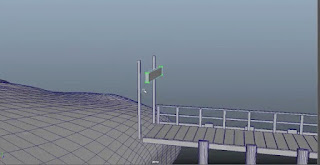
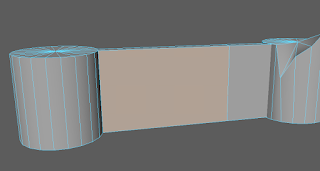
For my islands I wanted to something a little more simple yet more expansive just to see how everything would turn out in the environment and make changes where I see them to be fit. I'm not sure on where I might possibly take this project as I might just model it and learn from the experience, but we'll see how things turn out. Oh I almost forgot to show some of the work I have started already! Here ya go:


Tuesday, April 4, 2017

Professional Project Review

This is a project for a design for a company called Fractal Design and one of their new products. The animation showcases the ins and outs of the computer and focuses on specific parts of the product. The 3D design was very well done and looks incredibly smooth and sleek looking and the model accurately shows off the specifics of the computer. The figurative "story" of this animation is how sleek and incredibly powerful this computer is and all of the parts that go into it taking it into the "next-level" of computer technology. The way the animator made smooth transitions and crafted each piece with incredulous attention to detail make for an amazing product reveal and entices the viewer to want to know more. These key elements are something that I hope to include in my own work along with my own knowledge of camera arcs to hopefully replicate this process and to create a piece that even comes close to this type of animation. I feel as though the animator did a very well job of showcasing the product and does it in such a way that it blows away the competition and beats out the animation of even some businesses and their designs that are done by a team of animators. Despite this, I believe the animator made a very poor choice in the text in terms of color and placement that didn't make it really stand out and was often in places that just didn't attract attention.

Source: https://www.behance.net/gallery/50608963/Fractal-Design

Wednesday, March 22, 2017

The Plausible Impossible

This scene shows Donald Duck meeting his cousin Gus Goose. Gus greets Donald with a handshake that is seemingly impossible. For one, geese and ducks don't have the same hand bones as humans do so a "finger clasping" handshake should be impossible for the two relatives. The second impossibility is the fact that Gus makes Donald squash down and spring up again. Handshakes are a human like trait that when applied to humanoid like creatures, such as the human like Donald Duck, we as viewers believe that that is a-ok and nothing is off about. While the handshakes we receive often feel as though the other party is trying to throw you around with a shake, we know that this is highly unlikely to happen in a standard handshake.


The next scene shows Gus beginning his very extravagant meal by literally inhaling a bowl of soup. Gus does not eat soup how soup is even considered to be eaten. Gus is using two spoons to literally shovel soup into his mouth in gigantic quantities and appears to be spilling quite a bit despite there being no evidence of liquids on the table or on himself. This is impossible because liquid cannot be "shoveled" in such a manner that it flings itself into a persons mouth and they are able to eat it at that speed. This is plausible however as the term "shoveling down food" is often used to describe someone who can consume large quantities of food at an extremely fast rate.


The Next scene I chose was the one in which Gus goes to sit down to begin his feast at Donald's dinner table. Gus gains a massive amount of momentum and jumps into the chair which causes it to act like a spring thats just been flicked and it reverberates back in forth drastically. This is impossible because chairs do not have that level of springiness to them that would allow them to do that. On the other hand if you do run at a chair full speed or even just run at a chair it will get knocked backwards and possibly even fall down due to momentum of your body hitting the chair.


The next scene was Gus making a sock out of spaghetti noodles using knitting needles. This is impossible as noodles are not very structurally stable and are very fragile. However, in theory this could work if the noodles were tough enough and the person knitting was an expert knitter and could create a sock with ease.


The final scene is one in which Gus is making a sandwich by folding the ingredients like a deck of cards and shuffling the ingredients together to form a gigantic stacked sandwich. This is impossible because there is no way to shuffle the lunch meats and cheeses into stacked slices of bread and effectively make a sandwich. This could be possible if you went slowly layer by layer stacking the ingredients in a card like manner and made a giant sandwich out of it.


Tuesday, February 7, 2017

S.P.Ooky Final

This was a stop motion project that was set to a horror/scary movie theme. The goal of the project was to create a horror villain that was to chase a group of teenagers. This was a kind of play on a horror movie cliche with a teleporting villain and a group of "dumb teenagers" involved. We wanted to create a sense of urgency and to escape the villain. Overall the project turned out very well being our first stop-motion animation film.

Tuesday, December 20, 2016

Professional Project Review

League of Legends 2016 Mis-Season Invitational 

This was an animation for a tournament for League of Legends that happened earlier this year. It showcased the mascots representing each region that was participating in the tournament. This was all 3-d animation and the creators used a smoke-effect around objects that were 3-d modeled and animated. They also had glow affects to symbolize certain aspects about each mascot like the eyes of the Wolves or the crown on the Angel. The story of this was to announce the teams from each region that would be competing in the tournament. I would definitely try to apply the smoke affect to animations that I might create in the future, especially when applying it to an already existing 3-d modeled object and animation. I have already learned how to 3-d animate objects and living things so adding a smoke affect to anything wouldn't be that much of a problem. The creators did a very well job of introducing each team and the mascots representing them. The introduction of each mascot was also very well done as it flowed incredibly smoothly and moved right into each scene as it comes about. The one thing I recommend is for the narration that is supposed to be there is very distorted and not very loud so it was hard to understand what the announcer's voices commentating in the background. Overall this is a very good animation and is put together with major attention to detail and a strong sense of excitement is built for any fan of the game and teams that play professionally.

Link: https://www.behance.net/gallery/36592183/LEAGUE-OF-LEGENDS-2016-MID-SEASON-INVITATIONAL


Monday, December 19, 2016

Professional Article

The Future of Animation Is... A Look into Industry Professional's Animated Crystal Balls


This article is an article about the future of many different fields of animation from several lead designers in their fields and their opinions on the future of animation. The author's and their comments help to provide insight into what the future of the animation field could look like. Many animators state that the industry has never been more booming and increasingly more and more demanding every day. With the success of animated movies that continue to roll out, Arthur Kautz states that, "animated movies have outperformed all other genres of film at the domestic and worldwide box office." This goes to show that animated movies is going to be an increasingly high demand field in the future for anyone interested in starting somewhere. Another point brought across by several animators is that animation is headed off into the realm of mobile devices. These authors state that with many app development kits being able to run off of PC and Mac operating systems, it allows more creative and innovative animations to come to life. One example is a game called The Little Fox. The Little Fox is a polygonal platform adventure game produced by Oleg Batrakov. This is the first highly successful game in this style of animation and hundreds of other developers have hoped on that train and started producing their own games in that polygonal style. Personally I feel that these animators all make valid points on where animation is going in the future. As someone who frequently watches and plays a variety of movies and games, I have a wide spectrum of animation styles to make my own biases on. I agree that animation will more than definitely start to have a bigger role in the mobile word, and not just when it comes to games. The proof lies in apps and switchboards that allow you to customize the animations on your phone and even on your computers as well, which according to many of these animators, will become a very prosperous industry in the near future.

http://www.animationcareerreview.com/articles/future-animation-look-industry-professionals-animated-crystal-balls 

Technical Tutorial

The skill that I will be teaching today is how to create a shatter effect on any flat surface in Maya. You start off by selecting the surface you want to shatter using the face select tool.
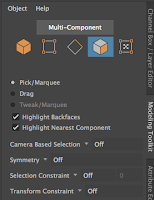
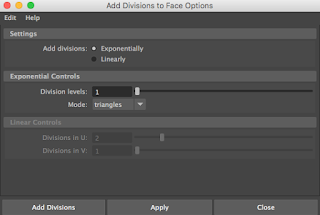
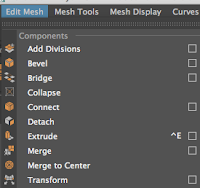


 Then go to edit mesh and mouse over to the small white square next to the tab "Add Divisions." A window should pop up with setting changes for adding divisions, and to start make the division levels 1 and mode on triangles (Note: This can be changed to quads if you want to start with that instead of triangles). After making sure that is all selected properly go ahead and click on apply.
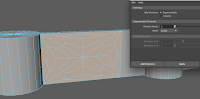


Your surface should now have a pattern made with lines on it, this is how you know it worked. After making that first set of divisions, go ahead and click apply once more to add another layer of-


divisions using either the quads or triangles setting, in this example I used the quads. After your second divisions are added go ahead and add your third and final division to the wall using your method of choice. After that start selecting faces in the divisions, roughly half of your faces should be used, but that's all up to personal preference. After selected your desired number of faces click on the extrude button and proceed to push the faces into the wall creating indents where the faces are. After pushing these back into the wall start selecting other faces that aren't indented, roughly the same number as the other set. After selecting these faces select the extrude tool once again, and begin to pull these faces out from the wall just slightly, created a staggered look across the wall. Now to make the wall look even more shattered, go into vertices mode and select the centermost point on your wall. Then, turn on soft select mode by pressing the (B) key, (B key is defaulted for soft-select), after that the lines should get a yellow glow around them to signify that soft-select is on. Once it is on, push the centermost point in towards the wall to create a warped wall effect as if and object had struck it. After that your wall should be completely done, so at this point feel free to add any textures you want, or even go through it again and change up the type of divisions you want to have in it.